F4HWN

스타1,121포크163라이선스Apache-2.0언어C최근 업데이트2026. 3. 1.

Egzumer를 바탕으로 한 F4HWN 펌웨어의 UV-K5 V1 계열판이에요. Bandscope·Basic·Broadcast·Game·RescueOps 등 용도별 빌드로 나와요.

  • UV-K5 / K5(8)
  • UV-K6
  • UV-5R Plus
MCUDP32G030릴리스 파일 분석
💬 댓글 0

릴리스

파일은 GitHub에서 그대로 내려받아요. ‘내 무전기에 넣기’를 누르면 펌웨어 플래싱 도구가 이 파일로 열려요. 마지막 확인 2026. 10. 17.

v4.3 F4HWN v4.3최신2025. 12. 2.
릴리스 노트
# 💻FLASH WITH A BROWSER💻

I suggest you choose one of the following 5 editions:

# [📺 Bandscope edition (without FM broadcast support and VOX feature)](https://armel.github.io/uvtools/?firmwareURL=https://github.com/armel/uv-k5-firmware-custom/raw/main/archive/f4hwn.bandscope.packed.v4.3.bin)

# [📻 Broadcast edition (without bandscope support)](https://armel.github.io/uvtools/?firmwareURL=https://github.com/armel/uv-k5-firmware-custom/raw/main/archive/f4hwn.broadcast.packed.v4.3.bin)

# [🚨 RescueOps edition, dedicated to first responders (without Bandscope and Broadcast)](https://armel.github.io/uvtools/?firmwareURL=https://github.com/armel/uv-k5-firmware-custom/raw/main/archive/f4hwn.rescueops.packed.v4.3.bin)

# [☘️ Basic edition, with Bandscope (without channel name display and parameter saving) and Broadcast FM, but lacking the following features: Air Copy, VOX, Mic Bar, Contrast (SetCtr), Resume Mode, and Mute](https://armel.github.io/uvtools/?firmwareURL=https://github.com/armel/uv-k5-firmware-custom/raw/main/archive/f4hwn.basic.packed.v4.3.bin)

# [🎮 Game edition, with a small breakout game and FM Broadcast (without Bandscope support and VOX feature)](https://armel.github.io/uvtools/?firmwareURL=https://github.com/armel/uv-k5-firmware-custom/raw/main/archive/f4hwn.game.packed.v4.3.bin)

📘 Up to date manual available in a [Wiki section](https://github.com/armel/uv-k5-firmware-custom/wiki) 📘
⭐ Dedicated CHIRP driver available as an attachment ⭐️

# 🖥️ About the K5 Viewer feature

You can use K5 Viewer on your PC either as a [Python script](https://github.com/armel/uv-k5-firmware-custom/tree/main/k5viewer), or as a [web application](https://armel.github.io/k5viewer/) directly in Chrome-based browser (like Chrome, Edge, Opera, etc.).

Here is a quick tutorial for dummies:

1️⃣ Flash your Quansheng K5 with F4HWN firmware v4.3 (Bandscope, Broadcast, or RescueOps edition only)
2️⃣ Keep the K5 connected to your PC via the USB cable
3️⃣ Go to [https://armel.github.io/k5viewer/](https://armel.github.io/k5viewer/)
4️⃣ Click Connect (and select the serial port)

That’s it. Nothing to install. Nothing to configure. Just plug and view 🤭

# 🧭 How to choose the right firmware edition for your needs?

| Edition | Key Features |
|--------|--------------|
| 📺 [ **Bandscope edition**](https://armel.github.io/uvtools/?firmwareURL=https://github.com/armel/uv-k5-firmware-custom/raw/main/archive/f4hwn.bandscope.packed.v4.3.bin) | ✅ Bandscope<br/>🚫 FM Broadcast<br/>🚫 VOX<br/>✅ Air Copy<br/>✅ K5 Viewer<br/>✅ All other features enabled|
| 📻 [ **Broadcast edition**](https://armel.github.io/uvtools/?firmwareURL=https://github.com/armel/uv-k5-firmware-custom/raw/main/archive/f4hwn.broadcast.packed.v4.3.bin) | ✅ FM Broadcast<br/>🚫 Bandscope<br/>✅ VOX<br/>✅ Air Copy<br/>✅ K5 Viewer<br/>✅ All other features enabled|
| 🚨 [ **RescueOps edition**](https://armel.github.io/uvtools/?firmwareURL=https://github.com/armel/uv-k5-firmware-custom/raw/main/archive/f4hwn.rescueops.packed.v4.3.bin) | ✅ First responder oriented<br/>🚫 FM Broadcast<br/>🚫 Bandscope<br/>✅ VOX<br/>✅ Air Copy<br/>✅ K5 Viewer<br/>✅ All other features enabled |
| ☘️ [ **Basic edition**](https://armel.github.io/uvtools/?firmwareURL=https://github.com/armel/uv-k5-firmware-custom/raw/main/archive/f4hwn.basic.packed.v4.3.bin) | ✅ FM Broadcast<br/>✅ Bandscope *(simplified)*<br/>🚫 VOX<br/>🚫 Air Copy<br/>🚫 K5 Viewer<br/><br/>Some features had to be disabled because of limited available memory...<br/><br/>🚫 Mic Bar<br/>🚫 Contrast<br/>🚫 Resume<br/>🚫 Mute |
| 🎮 [ **Game edition**](https://armel.github.io/uvtools/?firmwareURL=https://github.com/armel/uv-k5-firmware-custom/raw/main/archive/f4hwn.game.packed.v4.3.bin) | ✅ Built-in mini Breakout-style game<br/>✅ FM Broadcast<br/>🚫 Bandscope<br/>🚫 VOX<br/>✅ Air Copy<br/>🚫 K5 Viewer<br/>✅ All other features enabled|

# Changes

🇺🇸 EN
- Optimization of the build script (thanks sh0shin)
- Code refactoring and memory usage improvements (thanks sh0shin and bare-metal-bytes)
- Improve spectrum analyser on Bandscope edition (thanks nakonechny)
- Several small bug fixes and improvements (thanks wutje)
- Fix possible bug with repeaters
- Fix bad directive

This release will likely be the last one for the UV-K5 V1 models based on the DP32G030. The journey now continues with the UV-K1 and the UV-K5 V3, both powered by the PY32F071.

🇫🇷 FR
- Optimisation du script de compilation (merci sh0shin)
- Refactorisation du code et amélioration de la gestion mémoire (merci sh0shin et bare-metal-bytes)
- Amélioration de l’analyseur de spectre dans l’édition Bandscope (merci nakonechny)
- Plusieurs petits correctifs et améliorations (merci à wutje)
- Correction d’un bug potentiel avec les répéteurs
- Correction d’une directive incorrecte

Cette version sera probablement la dernière pour les UV-K5 V1 basés sur le DP32G030. L’aventure va désormais se poursuivre avec les UV-K1 et les UV-K5 V3 équipés du PY32F071.

Bandscope edition, 223 bytes left.
Broadcast edition, 1 251 bytes left.
RescueOps edition, 3 799 bytes left.
Basic edition, 231 bytes left.
Game edition, 75 bytes left.

Enjoy,

Armel F4HWN.

💡 For Quansheng K5 users with an SA818 based hotspot, special *.sa818.bin versions are available in the `archive` directory. These versions avoid the squelch tail. __However, you must first activate Close Tail Command on the SA818__.
GitHub에서 보기 ↗
v4.2 F4HWN v4.22025. 8. 7.
릴리스 노트
# 💻FLASH WITH A BROWSER💻

I suggest you choose one of the following 5 editions:

# [📺 Bandscope edition (without FM broadcast support and VOX feature)](https://armel.github.io/uvtools/?firmwareURL=https://github.com/armel/uv-k5-firmware-custom/raw/main/archive/f4hwn.bandscope.packed.v4.2.bin)

# [📻 Broadcast edition (without bandscope support)](https://armel.github.io/uvtools/?firmwareURL=https://github.com/armel/uv-k5-firmware-custom/raw/main/archive/f4hwn.broadcast.packed.v4.2.bin)

# [🚨 RescueOps edition, dedicated to first responders (without Bandscope and Broadcast)](https://armel.github.io/uvtools/?firmwareURL=https://github.com/armel/uv-k5-firmware-custom/raw/main/archive/f4hwn.rescueops.packed.v4.2.bin)

# [☘️ Basic edition, with Bandscope (without channel name display and parameter saving) and Broadcast FM, but lacking the following features: Air Copy, VOX, Mic Bar, Contrast (SetCtr), Resume Mode, and Mute](https://armel.github.io/uvtools/?firmwareURL=https://github.com/armel/uv-k5-firmware-custom/raw/main/archive/f4hwn.basic.packed.v4.2.bin)

# [🎮 Game edition, with a small breakout game and FM Broadcast (without Bandscope support and VOX feature)](https://armel.github.io/uvtools/?firmwareURL=https://github.com/armel/uv-k5-firmware-custom/raw/main/archive/f4hwn.game.packed.v4.2.bin)

📘 Up to date manual available in a [Wiki section](https://github.com/armel/uv-k5-firmware-custom/wiki) 📘
⭐ Dedicated CHIRP driver available as an attachment ⭐️

# 🖥️ About the K5 Viewer feature

You can use K5 Viewer on your PC either as a [Python script](https://github.com/armel/uv-k5-firmware-custom/tree/main/k5viewer), or as a [web application](https://armel.github.io/k5viewer/) directly in Chrome-based browser (like Chrome, Edge, Opera, etc.).

Here is a quick tutorial for dummies:

1️⃣ Flash your Quansheng K5 with F4HWN firmware v4.2 (Bandscope, Broadcast, or RescueOps edition only)
2️⃣ Keep the K5 connected to your PC via the USB cable
3️⃣ Go to [https://armel.github.io/k5viewer/](https://armel.github.io/k5viewer/)
4️⃣ Click Connect (and select the serial port)

That’s it. Nothing to install. Nothing to configure. Just plug and view 🤭

# 🧭 How to choose the right firmware edition for your needs?

| Edition | Key Features |
|--------|--------------|
| 📺 [ **Bandscope edition**](https://armel.github.io/uvtools/?firmwareURL=https://github.com/armel/uv-k5-firmware-custom/raw/main/archive/f4hwn.bandscope.packed.v4.2.bin) | ✅ Bandscope<br/>🚫 FM Broadcast<br/>🚫 VOX<br/>✅ Air Copy<br/>✅ K5 Viewer<br/>✅ All other features enabled|
| 📻 [ **Broadcast edition**](https://armel.github.io/uvtools/?firmwareURL=https://github.com/armel/uv-k5-firmware-custom/raw/main/archive/f4hwn.broadcast.packed.v4.2.bin) | ✅ FM Broadcast<br/>🚫 Bandscope<br/>✅ VOX<br/>✅ Air Copy<br/>✅ K5 Viewer<br/>✅ All other features enabled|
| 🚨 [ **RescueOps edition**](https://armel.github.io/uvtools/?firmwareURL=https://github.com/armel/uv-k5-firmware-custom/raw/main/archive/f4hwn.rescueops.packed.v4.2.bin) | ✅ First responder oriented<br/>🚫 FM Broadcast<br/>🚫 Bandscope<br/>✅ VOX<br/>✅ Air Copy<br/>✅ K5 Viewer<br/>✅ All other features enabled |
| ☘️ [ **Basic edition**](https://armel.github.io/uvtools/?firmwareURL=https://github.com/armel/uv-k5-firmware-custom/raw/main/archive/f4hwn.basic.packed.v4.2.bin) | ✅ FM Broadcast<br/>✅ Bandscope *(simplified)*<br/>🚫 VOX<br/>🚫 Air Copy<br/>🚫 K5 Viewer<br/><br/>Some features had to be disabled because of limited available memory...<br/><br/>🚫 Mic Bar<br/>🚫 Contrast<br/>🚫 Resume<br/>🚫 Mute |
| 🎮 [ **Game edition**](https://armel.github.io/uvtools/?firmwareURL=https://github.com/armel/uv-k5-firmware-custom/raw/main/archive/f4hwn.game.packed.v4.2.bin) | ✅ Built-in mini Breakout-style game<br/>✅ FM Broadcast<br/>🚫 Bandscope<br/>🚫 VOX<br/>✅ Air Copy<br/>🚫 K5 Viewer<br/>✅ All other features enabled|

# Changes

🇺🇸 EN
- Optimization of the build script
- Code refactoring and memory usage improvements (thanks Reppad)
- Integration of the k5viewer feature in Bandscope, Broadcast, and RescueOps editions
- Development of the k5viewer Python script
- Development of the k5viewer Web application
- Improvement of the k5viewer Python script (thanks Michael)
- Add Narrower feature in the Basic edition

🇫🇷 FR
- Optimisation du script de compilation
- Refactorisation du code et amélioration de la gestion mémoire (merci Reppad)
- Intégration de la fonctionnalité k5viewer dans les éditions Bandscope, Broadcast et RescueOps
- Développement du script Python k5viewer
- Développement de l’application Web k5viewer
- Amélioration du script Python k5viewer (merci Michael)
- Ajout de la fonctionnalité Narrower dans l’édition Basic

Bandscope edition, 391 bytes left.
Broadcast edition, 1 311 bytes left.
RescueOps edition, 3 559 bytes left.
Basic edition, 51 bytes left.
Game edition, 599 bytes left.

Enjoy,

Armel F4HWN.

💡 For Quansheng K5 users with an SA818 based hotspot, special *.sa818.bin versions are available in the `archive` directory. These versions avoid the squelch tail. __However, you must first activate Close Tail Command on the SA818__.
GitHub에서 보기 ↗
v4.1 F4HWN v4.12025. 7. 5.
릴리스 노트
# 💻FLASH WITH A BROWSER💻

I suggest you choose one of the following 5 editions:

# [📺 Bandscope edition (without FM broadcast support and VOX feature)](https://armel.github.io/uvtools/?firmwareURL=https://github.com/armel/uv-k5-firmware-custom/raw/main/archive/f4hwn.bandscope.packed.v4.1.bin)

# [📻 Broadcast edition (without bandscope support)](https://armel.github.io/uvtools/?firmwareURL=https://github.com/armel/uv-k5-firmware-custom/raw/main/archive/f4hwn.broadcast.packed.v4.1.bin)

# [🚨 RescueOps edition, dedicated to first responders (without Bandscope and Broadcast)](https://armel.github.io/uvtools/?firmwareURL=https://github.com/armel/uv-k5-firmware-custom/raw/main/archive/f4hwn.rescueops.packed.v4.1.bin)

# [☘️ Basic edition, with Bandscope (without channel name display and parameter saving) and Broadcast FM, but lacking the following features: Air Copy, VOX, Mic Bar, Narrower (SetNFM), Contrast (SetCtr), Resume Mode, and Mute](https://armel.github.io/uvtools/?firmwareURL=https://github.com/armel/uv-k5-firmware-custom/raw/main/archive/f4hwn.basic.packed.v4.1.bin)

# [🎮 Game edition, with a small breakout game and FM Broadcast (without Bandscope support and VOX feature)](https://armel.github.io/uvtools/?firmwareURL=https://github.com/armel/uv-k5-firmware-custom/raw/main/archive/f4hwn.game.packed.v4.1.bin)

# 🧭 How to choose the right firmware edition for your needs?

| Edition | Key Features |
|--------|--------------|
| 📺 [ **Bandscope edition**](https://armel.github.io/uvtools/?firmwareURL=https://github.com/armel/uv-k5-firmware-custom/raw/main/archive/f4hwn.bandscope.packed.v4.1.bin) | ✅ Bandscope<br/>🚫 FM Broadcast<br/>🚫 VOX<br/>✅ Air Copy<br/>✅ All other features enabled|
| 📻 [ **Broadcast edition**](https://armel.github.io/uvtools/?firmwareURL=https://github.com/armel/uv-k5-firmware-custom/raw/main/archive/f4hwn.broadcast.packed.v4.1.bin) | ✅ FM Broadcast<br/>🚫 Bandscope<br/>✅ VOX<br/>✅ Air Copy<br/>✅ All other features enabled|
| 🚨 [ **RescueOps edition**](https://armel.github.io/uvtools/?firmwareURL=https://github.com/armel/uv-k5-firmware-custom/raw/main/archive/f4hwn.rescueops.packed.v4.1.bin) | ✅ First responder oriented<br/>🚫 FM Broadcast<br/>🚫 Bandscope<br/>✅ VOX<br/>✅ Air Copy<br/>✅ All other features enabled |
| ☘️ [ **Basic edition**](https://armel.github.io/uvtools/?firmwareURL=https://github.com/armel/uv-k5-firmware-custom/raw/main/archive/f4hwn.basic.packed.v4.1.bin) | ✅ FM Broadcast<br/>✅ Bandscope *(simplified)*<br/>🚫 VOX<br/>🚫 Air Copy<br/><br/>Some features had to be disabled because of limited available memory...<br/><br/>🚫 Mic Bar<br/>🚫 Narrower<br/>🚫 Contrast<br/>🚫 Resume<br/>🚫 Mute |
| 🎮 [ **Game edition**](https://armel.github.io/uvtools/?firmwareURL=https://github.com/armel/uv-k5-firmware-custom/raw/main/archive/f4hwn.game.packed.v4.1.bin) | ✅ Built-in mini Breakout-style game<br/>✅ FM Broadcast<br/>🚫 Bandscope<br/>🚫 VOX<br/>✅ Air Copy<br/>✅ All other features enabled|

# 📘 Documentation 

Up to date manual available in a [Wiki section](https://github.com/armel/uv-k5-firmware-custom/wiki).

# ⚙️ CHIRP driver

Dedicated CHIRP driver available as an attachment.

# ♻️ Changes

🇺🇸 EN
- Refactoring and optimization of the compilation script,
- Improved fine-tuning of the spectrum analyzer,
- Improved exclude of memory channels in scan mode (Issue #407, thanks Daniel),
- New Game edition with a small breakout game.

🇫🇷 FR
- Refactoring et optimisation du script de compilation,
- Amélioration des paramétrages fin de l'analyseur de spectre,
- Amélioration du blocage des canaux mémoires en phase de scan (Issue #407, merci Daniel),
- Nouvelle édition Game avec petit jeu de casse brique.

Bandscope edition, 731 bytes left.
Broadcast edition, 1 751 bytes left.
RescueOps edition, 3 687 bytes left.
Basic edition, 47 bytes left.
Game edition, 115 bytes left.

Enjoy,

Armel F4HWN.

💡 For Quansheng K5 users with an SA818 based hotspot, special *.sa818.bin versions are available in the `archive` directory. These versions avoid the squelch tail. __However, you must first activate Close Tail Command on the SA818__.
GitHub에서 보기 ↗
v4.0 F4HWN v4.02025. 2. 22.
릴리스 노트
# 💻FLASH WITH A BROWSER💻

I suggest you choose one of the following 4 editions:

# [📺 Bandscope edition (without FM broadcast support)](https://egzumer.github.io/uvtools/?firmwareURL=https://github.com/armel/uv-k5-firmware-custom/raw/main/archive/f4hwn.bandscope.packed.v4.0.bin)

# [📻 Broadcast edition (without bandscope support)](https://egzumer.github.io/uvtools/?firmwareURL=https://github.com/armel/uv-k5-firmware-custom/raw/main/archive/f4hwn.broadcast.packed.v4.0.bin)

# [🚨 RescueOps edition, dedicated to first responders (without Bandscope and Broadcast)](https://egzumer.github.io/uvtools/?firmwareURL=https://github.com/armel/uv-k5-firmware-custom/raw/main/archive/f4hwn.rescueops.packed.v4.0.bin)

# [☘️ Basic edition, with Bandscope (without channel name display and parameter saving) and Broadcast FM, but lacking the following features: Air Copy, VOX, Mic Bar, Narrower (SetNFM), Contrast (SetCtr), Resume Mode, and Mute](https://egzumer.github.io/uvtools/?firmwareURL=https://github.com/armel/uv-k5-firmware-custom/raw/main/archive/f4hwn.basic.packed.v4.0.bin)

📘 Up to date manual available in a [Wiki section](https://github.com/armel/uv-k5-firmware-custom/wiki) 📘
⭐ Dedicated CHIRP driver available as an attachment ⭐️

# Changes

🇺🇸 EN
- Refactoring and memory optimization (~175 bytes),
- Fixed a bug related to the use of custom AES keys (Issue #363),
- Improved Bandscope (Issue #322, thanks John),
- Enhanced Resume Mode: auto restart in Scan, Bandscope or FM Broadcast mode, 
- Added MUTE action to disable sound (BK4819 & BK1080),
- Re-enabled the PMR band plan,
- Re-enabled the FR/GMRS/MURS band plan.

🇫🇷 FR
- Refactoring et optimisation de la mémoire (~ 175 octets),
- Correction d’un bug concernant l’utilisation de clés AES personnalisées (Issue #363),
- Amélioration du Bandscope (Issue #322, merci John),
- Amélioration du Mode Resume: redémarrage auto en mode Scan, Bandscope ou FM Broadcast, 
- Ajout de l’action MUTE pour couper le son (BK4819 & BK1080),
- Réactivation du plan de bandes PMR,
- Réactivation du plan de bandes FR/GMRS/MURS,

Bandscope edition, 15 bytes left.
Broadcast edition, 1 759 bytes left.
RescueOps edition, 3 703 bytes left.
Basic edition, 51 bytes left.

Enjoy,

Armel F4HWN.

💡 For Quansheng K5 users with an SA818 based hotspot, special *.sa818.bin versions are available in the `archive` directory. These versions avoid the squelch tail. __However, you must first activate Close Tail Command on the SA818__.
GitHub에서 보기 ↗
v3.9 F4HWN v3.92024. 12. 26.
릴리스 노트
# 💻FLASH WITH A BROWSER💻

I suggest you choose one of the following 3 editions:

# [📺 Bandscope version (without FM broadcast support)](https://egzumer.github.io/uvtools/?firmwareURL=https://github.com/armel/uv-k5-firmware-custom/raw/main/archive/f4hwn.bandscope.packed.v3.9.bin)

# [📻 Broadcast version (without bandscope support)](https://egzumer.github.io/uvtools/?firmwareURL=https://github.com/armel/uv-k5-firmware-custom/raw/main/archive/f4hwn.broadcast.packed.v3.9.bin)

# [🚨 RescueOps version (without Bandscope and Broadcast)](https://egzumer.github.io/uvtools/?firmwareURL=https://github.com/armel/uv-k5-firmware-custom/raw/main/archive/f4hwn.rescueops.packed.v3.9.bin)

📘 Up to date manual available in a [Wiki section](https://github.com/armel/uv-k5-firmware-custom/wiki) 📘
⭐ Dedicated CHIRP driver available as an attachment ⭐️

# Changes

🇺🇸 EN
- Refactoring and memory optimization,
- Improved scan recovery if scan range is selected (Fabrice),
- Set TxLock to ON for all channels if F Lock DISABLE ALL is selected #328,
- Added gauges to some delay settings (ergonomic improvement),
- Fixed channel name overlap on spectrum analyzer #309 (BandScope),
- Fixed battery overlap on status bar (RescueOps),
- POWER HIGH and REMOVE OFFSET actions should be reset when changing channel #326 (RescueOps),
- NOAA menu moved down and renamed SetNWR (RescueOps). Menu positions 1 to 68 are therefore the same for all 3 firmware editions.

🇫🇷 FR
- Refactoring et optimisation de la mémoire,
- Amélioration de la reprise du Scan si Scan Range est sélectionné,
- TxLock sur ON pour tous les canaux si F Lock DISABLE ALL est sélectionné #328,
- Ajout de jauges à certains réglages de délai (amélioration ergonomique),
- Correction du chevauchement des noms de canaux sur le spectre #309 (Bandscope),
- Correction du chevauchement de la (tension de la) batterie sur la barre d'état (RescueOps),
- Les actions POWER HIGH et REMOVE OFFSET sont réinitialisées lors d'un changement de canal #326,
- Le menu NOAA a été déplacé vers le bas et renommé SetNWR (les positions de menu 1 à 68 sont donc les mêmes pour les 3 éditions du firmware).

Bandscope version, 43 bytes left.
Broadcast version, 1 851 bytes left.
RescueOps version, 3 563 bytes left.

Enjoy,

Armel F4HWN.

💡 For Quansheng K5 users with an SA818 based hotspot, special *.sa818.bin versions are available in the `archive` directory. These versions avoid the squelch tail. __However, you must first activate Close Tail Command on the SA818__.
GitHub에서 보기 ↗
이전 릴리스 10개 더 보기 ↗

올리기 전에커스텀 펌웨어는 개인이 만든 것이고 RadioCloud가 내용을 검증하지 않아요. 올리기 전에 UV-K5 도구로 캘리브레이션이 포함된 원본 EEPROM을 백업해 두세요. 허가받은 범위 밖 송신은 전파법 위반입니다.

README

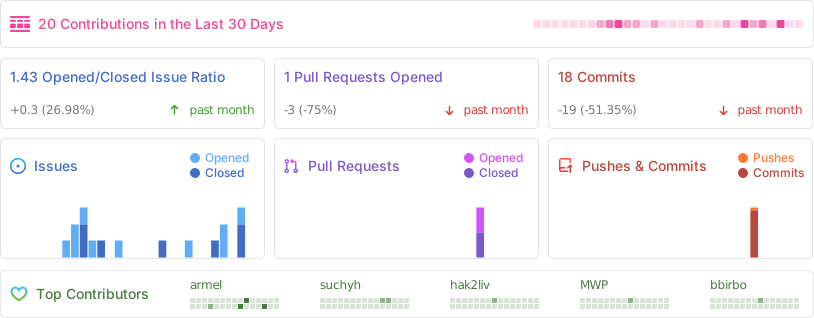
Stats

Alt

Open re-implementation of the Quansheng UV-K5/K6/5R v2.1.27 firmware

This repository is a fork of Egzumer custom firmware, who was a merge of OneOfEleven custom firmware with fagci spectrum analizer plus my few changes.

All is a cloned and customized version of DualTachyon's open firmware found here ... a cool achievement !

[!NOTE] EN - About Chirp, as many others firmwares, you need to use a dedicated driver available on this repository.

FR - A propos de Chirp, comme beaucoup d'autres firmwares, vous devez utiliser un pilote dédié disponible sur ce dépôt.

[!WARNING] EN - THIS FIRMWARE HAS NO REAL BRAIN. PLEASE USE YOUR OWN. Use this firmware at your own risk (entirely). There is absolutely no guarantee that it will work in any way shape or form on your radio(s), it may even brick your radio(s), in which case, you'd need to buy another radio. Anyway, have fun.

FR - CE FIRMWARE N'A PAS DE VÉRITABLE CERVEAU. VEUILLEZ UTILISER LE VÔTRE. Utilisez ce firmware à vos risques et périls. Il n'y a absolument aucune garantie qu'il fonctionnera d'une manière ou d'une autre sur votre (vos) radio(s), il peut même bousiller votre (vos) radio(s), dans ce cas, vous devrez acheter une autre radio. Quoi qu'il en soit, amusez-vous bien.

[!CAUTION] EN - I recommend to backup your eeprom with k5prog before playing with alternative firmwares. It's a good reflex to have.

FR - Je recommande de sauvegarder votre eeprom avec k5prog avant de jouer avec des firmwares alternatifs. C'est un bon réflexe à avoir.

Donations

Special thanks to Jean-Cyrille F6IWW (2 times), Fabrice 14RC123, David F4BPP, Olivier 14RC206, Frédéric F4ESO, Stéphane F5LGW, Jorge Ornelas (4 times), Laurent F4AXK, Christophe Morel, Clayton W0LED, Pierre Antoine F6FWB, Jean-Claude 14FRS3306, Thierry F4GVO, Eric F1NOU, PricelessToolkit, Ady M6NYJ, Tom McGovern (4 times), Joseph Roth, Pierre-Yves Colin, Frank DJ7FG, Marcel Testaz, Brian Frobisher, Yannick F4JFO, Paolo Bussola, Dirk DL8DF, Levente Szőke (2 times), Bernard-Michel Herrera, Jérôme Saintespes, Paul Davies, RS (3 times), Johan F4WAT, Robert Wörle, Rafael Sundorf, Paul Harker, Peter Fintl, Pascal F4ICR (2 times), Mike DL2MF, Eric KI1C (2 times), Phil G0ELM, Jérôme Lambert, Meinhard Frank Günther, Eliot Vedel, Alfonso EA7KDF, Jean-François F1EVM, Robert DC1RDB, Ian KE2CHJ, Daryl VK3AWA, Roberto Brunelli, Robert Boardman, Stephen Oliver, Nicolas F4INE and William Bruno for their donations. That’s so kind of them. Thanks so much 🙏🏻

Table of Contents

Main features and improvements from F4HWN:

  • several firmware versions:
    • Bandscope (with spectrum analyzer made by Fagci),
    • Broadcast (with commercial FM radio support),
    • Basic (with spectrum analyzer and commercial FM radios support, but without certain functions such as Vox, Aircopy, etc.),
    • RescueOps (specifically designed for first responders: firefighters, sea rescue, mountain rescue),
    • Game (with a small breakout game),
  • improve default power settings level:
    • Low1 to Low5 (<~20mW, ~125mW, ~250mW, ~500mW, ~1W),
    • Mid ~2W,
    • High ~5W,
    • User (see SetPwr),
  • improve S-Meter (IARU Region 1 Technical Recommendation R.1 for VHF/UHF - read more),
    • S-Meter (S0/S9) Level EEPROM settings that were introduced in the Egzumer firmware are now ignored and replaced by hardcoded values to comply with the IARU Recommendation.
  • improve bandscope (Spectrum Analyser):
    • add channel name,
    • add save of some spectrum parameters,
  • improve UI:
    • menu index is always visible, even if a menu is selected,
    • s-meter new design (Classic or Tiny),
    • MAIN ONLY screen mode,
    • DUAL and CROSS screen mode,
    • RX blink on VFO RX,
    • RX LED blink,
    • Squelch level and Monitor,
    • Step value,
    • CTCSS or DCS value,
    • KeyLock message,
    • last RX,
    • move BatTxt menu from 34/63 to 30/63 (just after BatSave menu 29/63),
    • rename BackLt to BLTime,
    • rename BltTRX to BLTxRx,
    • improve memory channel input,
    • improve keyboard frequency input,
    • add percent and gauge to Air Copy,
    • improve audio bar,
    • and more...
  • new menu entries and changes:
    • add SetPwr menu to set User power (<20mW, 125mW, 250mW, 500mW, 1W, 2W or 5W),
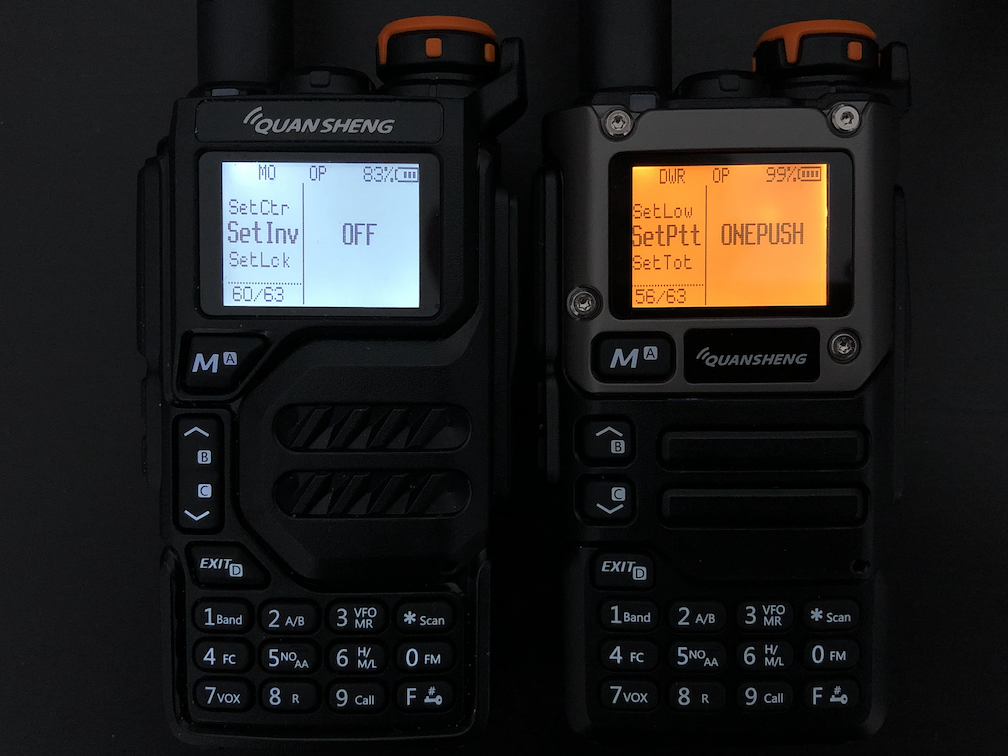
    • add SetPTT menu to set PTT mode (Classic or OnePush),
    • add SetTOT menu to set TOT alert (Off, Sound, Visual, All),
    • add SetCtr menu to set contrast (0 to 15),
    • add SetInv menu to set screen in invert mode (Off or On),
    • add SetEOT menu to set EOT (End Of Transmission) alert (Off, Sound, Visual, All),
    • add SetMet menu to set s-meter style (Classic or Tiny),
    • add SetLck menu to set what is locked (Keys or Keys + PTT),
    • add SetGUI menu to set font size on the VFO baseline (Classic or Tiny),
    • add TXLock menu to open TX on channel,
    • add SetTmr menu to set RX and TX timers (Off or On),
    • add SetOff menu to set the delay before the transceiver goes into deep sleep (Off or 1 minute to 2 hours),
    • add SetNFM menu to set Narrow width (12.5kHz or 6.25kHz),
    • rename BatVol menu (52/63) to SysInf, which displays the firmware version in addition to the battery status,
    • improve PonMsg menu,
    • improve BackLt menu,
    • improve TxTOut menu,
    • improve ScnRev menu (CARRIER from 250ms to 20s, STOP, TIMEOUT from 5s to 2m)
    • improve KeyLck menu (OFF, delay from 15s to 10m)
    • add HAM CA F Lock band (for Canadian zone),
    • add PMR 446 F Lock band,
    • add FRS/GMRS/MURS F Lock band,
    • remove blink and SOS functionality,
    • remove AM Fix menu (AM Fix is ENABLED by default),
    • add support of 3500mAh battery,
  • improve status bar:
    • add SetPtt mode in status bar,
    • change font and bitmaps,
    • move USB icon to left of battery information,
    • add RX and TX timers,
  • improve lists and scan lists options:
    • add new list 3,
    • add new list 0 (channel without list...),
    • add new scan lists options,
      • scan list 0 (all channels without list),
      • scan list 1,
      • scan list 2,
      • scan list 3,
      • scan lists [1, 2, 3],
      • scan all (all channels with or without list),
    • add scan list shortcuts,
  • add resume mode on startup (scan, bandscope and broadcast FM),
  • new actions:
    • RX MODE,
    • MAIN ONLY,
    • PTT,
    • WIDE NARROW,
    • 1750Hz,
    • MUTE,
    • POWER HIGH (RescueOps),
    • REMOVE OFFSET (RescueOps),
  • new key combinations:
    • add the F + UP or F + DOWN key combination to dynamically change the Squelch level,
    • add the F + F1 or F + F2 key combination to dynamically change the Step,
    • add F + 8 to quickly switch backlight between BLMin and BLMax on demand (this bypass BackLt strategy),
    • add F + 9 to return to BackLt strategy,
    • add long press on MENU, in * SCAN mode, to temporarily exclude a memory channel,
    • add short press on [0, 1, 2, 3, 4 or 5], in * SCAN mode, to dynamically change scan list.
  • many fix:
    • squelch,
    • s-meter,
    • DTMF overlaying,
    • scan list 2 ignored,
    • scan range limit,
    • clean display on startup,
    • no more PWM noise,
    • and more...
  • enabled AIR COPY
  • disabled ENABLE_DTMF_CALLING,
  • disabled SCRAMBLER,
  • remove 200Tx, 350Tx and 500Tx,
  • unlock TX on all bands needs only to be repeat 3 times,
  • code refactoring and many memory optimization,
  • displays the live screen of the Quansheng K5 on your computer via a USB-to-Serial cable,
  • and more...

Main features from Egzumer:

  • many of OneOfEleven mods:
    • AM fix, huge improvement in reception quality
    • long press buttons functions replicating F+ action
    • fast scanning
    • channel name editing in the menu
    • channel name + frequency display option
    • shortcut for scan-list assignment (long press 5 NOAA)
    • scan-list toggle (long press * Scan while scanning)
    • configurable button function selectable from menu
    • battery percentage/voltage on status bar, selectable from menu
    • longer backlight times
    • mic bar
    • RSSI s-meter
    • more frequency steps
    • squelch more sensitive
  • fagci spectrum analyzer (F+5 to turn on)
  • some other mods introduced by me:
    • SSB demodulation (adopted from fagci)
    • backlight dimming
    • battery voltage calibration from menu
    • better battery percentage calculation, selectable for 1600mAh or 2200mAh
    • more configurable button functions
    • long press MENU as another configurable button
    • better DCS/CTCSS scanning in the menu (* SCAN while in RX DCS/CTCSS menu item)
    • Piotr022 style s-meter
    • restore initial freq/channel when scanning stopped with EXIT, remember last found transmission with MENU button
    • reordered and renamed menu entries
    • LCD interference crash fix
    • many others...

Manual

Up to date manual is available in the Wiki section

Radio performance

Please note that the Quansheng UV-Kx radios are not professional quality transceivers, their performance is strictly limited. The RX front end has no track-tuned band pass filtering at all, and so are wide band/wide open to any and all signals over a large frequency range.

Using the radio in high intensity RF environments will most likely make reception anything but easy (AM mode will suffer far more than FM ever will), the receiver simply doesn't have a great dynamic range, which results in distorted AM audio with stronger RX'ed signals. There is nothing more anyone can do in firmware/software to improve that, once the RX gain adjustment I do (AM fix) reaches the hardwares limit, your AM RX audio will be all but non-existent (just like Quansheng's firmware). On the other hand, FM RX audio will/should be fine.

But, they are nice toys for the price, fun to play with.

Compiler

arm-none-eabi GCC version 10.3.1 is recommended, which is the current version on Ubuntu 22.04.03 LTS. Other versions may generate a flash file that is too big. You can get an appropriate version from: https://developer.arm.com/downloads/-/gnu-rm

clang may be used but isn't fully supported. Resulting binaries may also be bigger. You can get it from: https://releases.llvm.org/download.html

Building

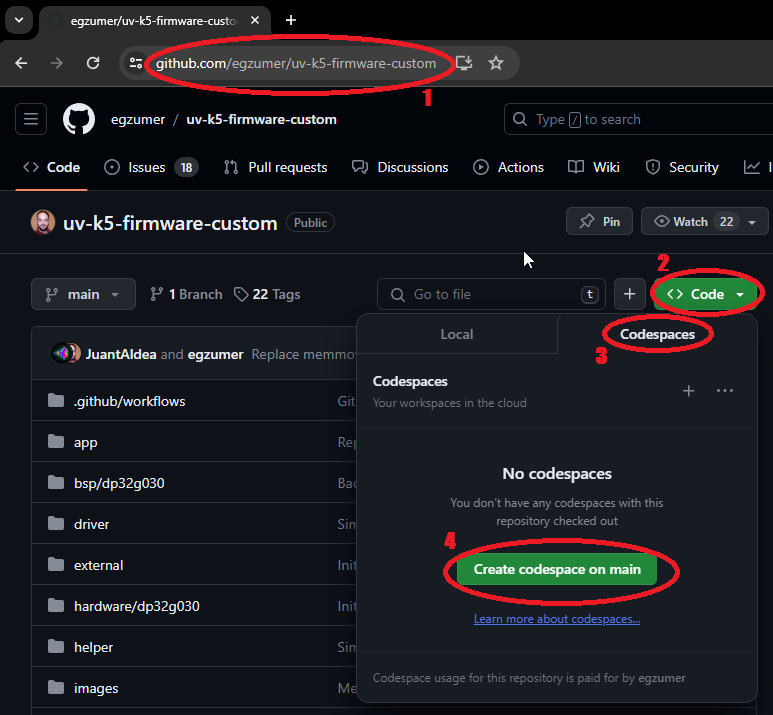
Github Codespace build method

This is the least demanding option as you don't have to install enything on your computer. All you need is Github account.

  1. Go to https://github.com/armel/uv-k5-firmware-custom
  2. Click green Code button
  3. Change tab from Local to Codespace
  4. Click green Create codespace on main button
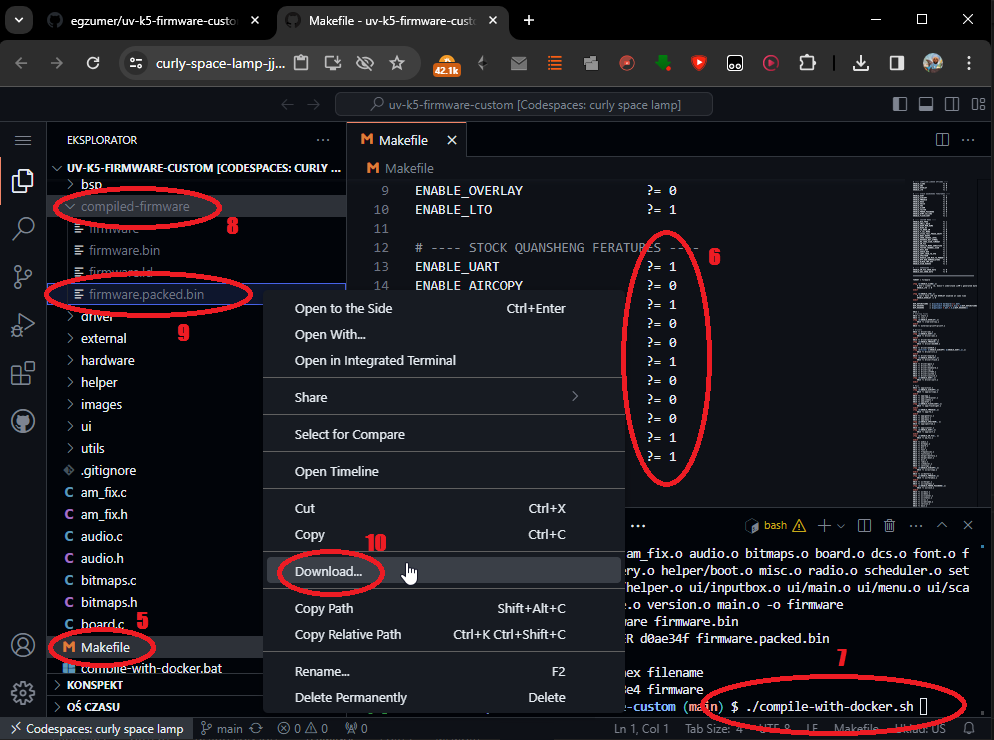
  1. Open Makefile, edit build options and save changes
  2. If necessary, open compile-with-docker.sh, edit build versions and save changes
  3. Run in terminal window
    • ./compile-with-docker.sh bandscope to compile bandscope version
    • ./compile-with-docker.sh broadcast to compile broadcast version
    • ./compile-with-docker.sh voxless to compile voxless version
    • ./compile-with-docker.sh all to compile all versions
    • ./compile-with-docker.sh custom to compile only with Makefile build options
  4. Open folder compiled-firmware
  5. Right click firmware.packed.bin
  6. Click Download, now you should have a firmware on your computer that you can proceed to flash on your radio. You can use online flasher
Docker build method

If you have docker installed you can use compile-with-docker.bat (Windows) or compile-with-docker.sh (Linux/Mac), the output files are created in compiled-firmware folder. This method gives significantly smaller binaries, I've seen differences up to 1kb, so it can fit more functionalities this way. The challenge can be (or not) installing docker itself.

[!TIP] On Linux/Mac, you may need to uncomment and customize the DOCKER_NETWORK environment variable at the beginning of the compile-with-docker.sh script. Note: this can introduce security risks by removing network isolation. However, if you encounter issues and are using a specific network environment (with a proxy or a firewall), this may help.

Windows environment build method

  1. Open windows command line and run:
    winget install -e -h git.git Python.Python.3.8 GnuWin32.Make
    winget install -e -h Arm.GnuArmEmbeddedToolchain -v "10 2021.10"
    
  2. Close command line, open a new one and run:
    pip install --user --upgrade pip
    pip install crcmod
    mkdir c:\projects & cd /D c:/projects
    git clone https://github.com/armel/uv-k5-firmware-custom.git
    
  3. From now on you can build the firmware by going to c:\projects\uv-k5-firmware-custom and running win_make.bat or by running a command line:
    cd /D c:\projects\uv-k5-firmware-custom
    win_make.bat
    
  4. To reset the repository and pull new changes run (!!! it will delete all your changes !!!):
    cd /D c:\projects\uv-k5-firmware-custom
    git reset --hard & git clean -fd & git pull
    

I've left some notes in the win_make.bat file to maybe help with stuff.

Credits

Many thanks to various people:

Other sources of information

ludwich66 - Quansheng UV-K5 Wiki
amnemonic - tools and sources of information

License

Copyright 2023 Dual Tachyon https://github.com/DualTachyon

Licensed under the Apache License, Version 2.0 (the "License"); you may not use this file except in compliance with the License. You may obtain a copy of the License at

http://www.apache.org/licenses/LICENSE-2.0

Unless required by applicable law or agreed to in writing, software
distributed under the License is distributed on an "AS IS" BASIS,
WITHOUT WARRANTIES OR CONDITIONS OF ANY KIND, either express or implied.
See the License for the specific language governing permissions and
limitations under the License.

Example changes/updates

Here are a few photos.
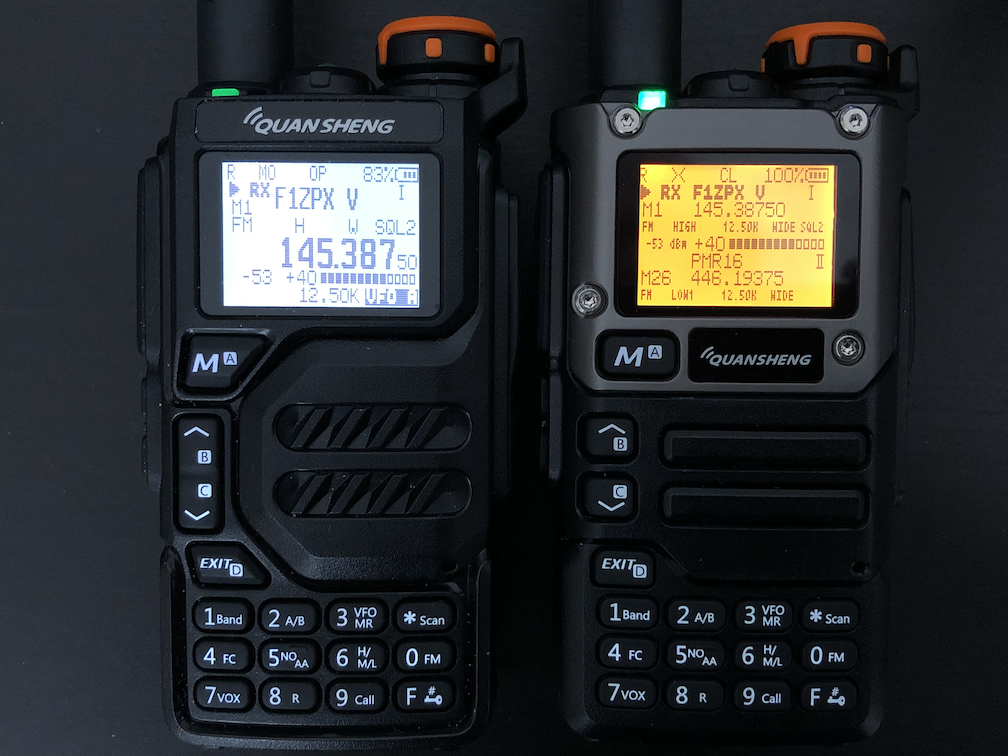
Main Only and Dual RX Respond
Main Only and Dual RX Respond (invert mode)
Some new menu entries
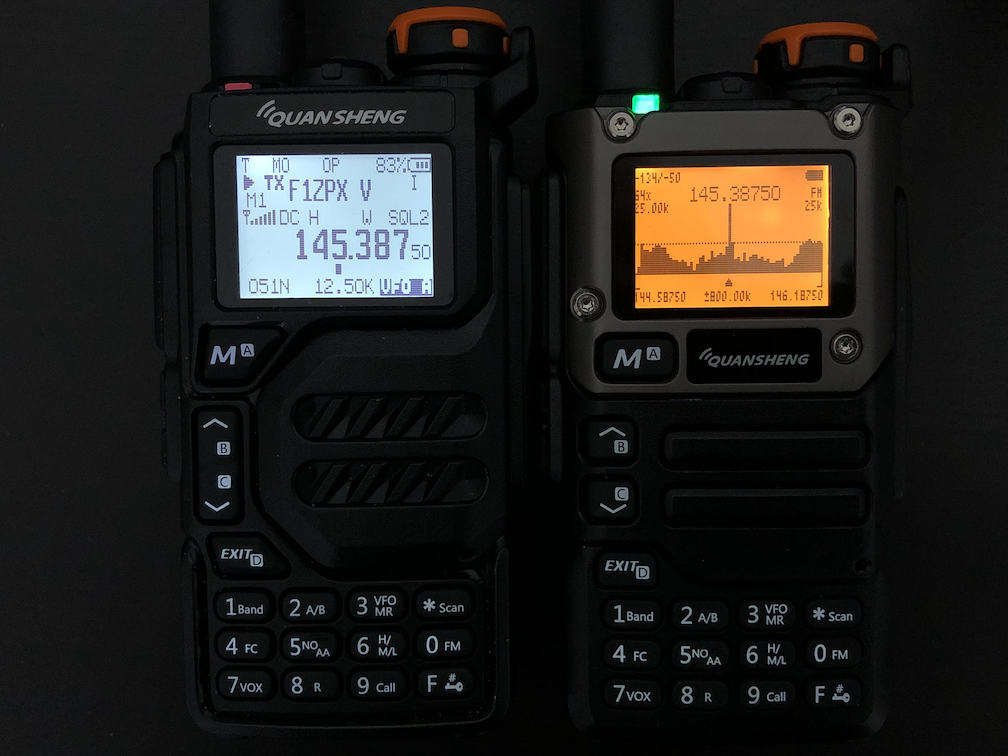
Main Only and Spectrum Analyzer

댓글 0

로그인하고 댓글을 남겨 보세요.